How To Use Ozlo Sleepbuds Without Turning Bedtime Into Another Tech Routine

Set up Sleepbuds 2 once with care and bedtime can become much simpler. This guide focuses on the settings worth deciding before your head reaches the pillow.
All featured products are selected by our editors and may include affiliate links. If you purchase through these links, we may earn a commission.
While Ozlos Sleepbuds may do much more than play a continuous sleep sound, opening an app every night can be counter to winding down. It is better to make the critical selections only once and then limit the nightly interaction to a minimum.
This guide walks you through pairing, fit, sound modes, alarms, phone-free controls and morning sleep data so Sleepbuds 2 feel like an extension of your routine, and not another item that requires your attention.
Start With The Setup Steps That Prevent Problems Later At Night
Charge the Smart Case and Sleepbuds before first use. Then download the Ozlo Sleep app. Ozlo recommends keeping the case, phone and buds nearby when pairing. The app manages the connection and allows access to noises, volume, alarms, timers, Sleep Modes and Sleep Patterns.
Pair Sleepbuds Through The Ozlo Sleep App
Open the Smart Case and wait until the status lights show the buds are ready. The app should find them during onboarding. If pairing becomes stubborn later, close and reopen the case first and keep the phone nearby before trying a reset.
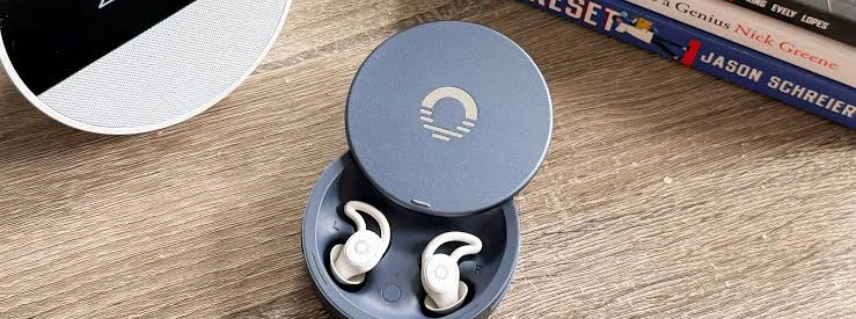
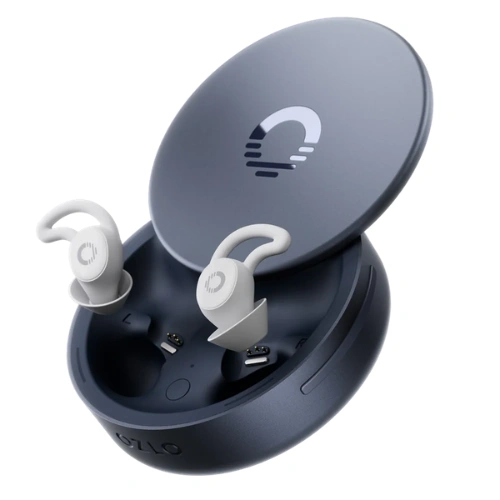
Don’t think of the Smart Case as storage but more a part of the system. It handles charging, environmental sensing and bedside controls, so having it nearby makes the bedtime routine go more smoothly.
Update The Software Before Building Your Nightly Routine
Check the app and firmware before choosing on how Ozlos Sleepbuds should act overnight. Ozlo continues to improve sound management, alarm previews and other settings, with its support guide recommending current software before adopting Sleep Patterns.
If you do updates earlier in the evening, you don’t find out about one after you get into bed. If the settings are working properly, then do not alter several settings at the same time, since it is easier to troubleshoot isolated modifications.
Get The Fit Right Before Trying To Block More Noise
The Sleepbuds 2 include four sizes of silicone tips. The good fit is one that closes gently, stays in place and doesn’t squeeze you after a few minutes on your normal side.
Choose Each Ear Tip Based On Comfort And Seal
Test each ear separately as you may not require the same size in both ears. Unlike active noise-cancelling headphones, these Sleep Earbuds rely on passive isolation and masking audio, so if you don’t have a good seal, the outside noise can seem louder.
Some made comfort better by changing to smaller tips, as seen in Reddit comments. It’s worth a shot before cranking up the volume or determining overnight that earbuds just don’t fit your ears.
Test The Fit In Your Normal Sleeping Position
Sitting up does not indicate comfort. Put in the buds, lie down on your normal pillow, flip to both sides and see whether there is any pressure. Sleepbuds 2 are low-profile, but your ear shape and cushion firmness will still matter.
If soreness appears, change fit before changing sound. Comfort is the foundation because effective masking has little value if the buds come out halfway through the night.
Choose How You Want Sound To Behave As You Fall Asleep
The most useful part of learning How To Use Ozlo Sleepbuds is figuring out what should happen when you cease actively listening. Sleepbuds 2 have multiple Sleep Modes that help automate the shift.
Start With Built-In Sounds When Noise Is The Main Problem
Simple Mode allows playback of a saved Sleep Sound without continuous Bluetooth streaming. That’s good for nights when the primary objective is drowning out snoring, traffic or unpredictable room sounds. Ozlo has over 60 sounds and soundscapes to sleep in.
Keep volume only as high as needed. A comfortable seal can often reduce the need to push sound louder, which makes long overnight listening easier.
Use Streaming When Audio Is Part Of Your Wind Down Routine
Sensing Mode can detect sleep and switch from streaming to concealing sounds, whether it’s podcasts, music or audiobooks that help you settle. Auto Mode can activate a Sleep Sound once streaming ceases and Time Delay Mode can activate one after a set amount of time.
Choose one transition that is consistent with your typical routine and apply it for several nights. That turns a big settings menu into something you hardly have to touch.
Set Your Alarm And Night Controls Before Putting Your Phone Away
Set the private in-ear alarm before you go to bed and preview the setting while you're still awake. Once it's installed, Ozlo says the alarm will function even without any active phone link, which is good. Sleep Shield can also cut down on disruptions from calls, notifications, and other Bluetooth audio.
A recent post on Reddit mentioned an Alarm and Sleep Sound changing on its own. A simple glance before putting the phone away can catch a strange setting without creating another long midnight job.
Make Phone Free Controls Part Of Your Bedtime Routine
The Sleepbuds 2 have a real Smart Case button that plays or pauses Sleep Sounds and snoozes an alarm. Recent feedback on Reddit keeps bringing up the button as being a helpful second-generation feature because it minimises the need to open the app in the dark.
Set your options and leave the case within reach before you go to sleep. If you have a Sleep Sound stored, phone-free playback can remove the phone from much of the nightly procedure after the first setup.
Check Sleep Patterns In The Morning Instead Of During The Night
Sleep Patterns can demonstrate sleep duration with room noise, light and temperature. Sync up in the morning and then search for repeating patterns over several nights rather than reacting to one aberrant result.
A Reddit user said that the tracker sometimes logged their waking time as sleep. That indicates that you should use the data as a helpful background, rather than a complete and accurate record, then compare trends with how rested you actually feel.
FAQs
Can Ozlo Sleepbuds Work Without A Phone?
Yes. When configured, they will play a saved Sleep Sound without an active phone or Bluetooth connection. Streaming still needs a connected source.
Do Ozlo Sleepbuds Have Active Noise Cancellation?
No. The fit of the Sleepbuds 2 is crucial to how well the sound is minimised, as they use silicone tips to passively cover your ears, as well as noise-masking sounds.
How Long Do Ozlo Sleepbuds Last Overnight?
Ozlo claims up to 14 hours of playtime with the Sleepbuds 2. Actual battery use will vary with streaming, loudness and functions used overnight.
What Is The Ozlo Sleepbuds Price?
Ozlo currently lists Sleepbuds 2 at 279 dollars in the United States with a 30-day return policy and a one-year warranty. Pricing can change, so checking the current product page before ordering is sensible.
The best habit is the one you don't even realise. Ozlo Sleepbuds 2 allows you to get the fit right, select a reliable sound transition and save sleep data until morning to help you keep bedtime focused on rest instead of settings.
Before ordering, people hoping to spend less can also check available Ozlo Promo Codes for potential savings.
Follow WearChronicles for more practical adult lifestyle guides.